


Easy Hairstyles for Girls
3.954.00 Reviews
App Specs
- Version
- 1.92
- Updated On
- License
- Free
- Downloads
- 5,000,000+
- Developer
- Nabil_Soft
- Categories
- Beauty
- Platform
- Android
Screenshots
 Analysis by AppCompare
I’d approach Easy Hairstyles for Girls as a visual guide for choosing and attempting a look, rather than as a personal stylist that knows your hair. The useful part is having examples and instructions to look at when you want to try something beyond your usual ponytail. If you’re new to styling, that can make the first attempt feel more manageable; if you already braid confidently, it can serve as a place to browse for ideas.
What to expect from the app
This is a free beauty app from Nabil_Soft, with an Everyone age rating. It has a 4.0 average from around 7,500 ratings and has passed five million installs, which suggests it has reached a broad audience, though popularity alone cannot tell you whether its styles suit your hair or patience level. The current version is 1.92, and it runs on Android 5.0 or later.
The name sets a fairly practical expectation: you’re looking for hairstyle inspiration you can act on with your own hands. I’d keep the first goal modest. Pick a style that looks close to something you already know how to do, then see whether the pictured steps are clear enough to follow. A polished result matters less than learning where to place your hands and how tightly to secure each section.
That distinction is important when comparing it with the usual alternatives. A short social video may show a finished look quickly, but it can skip the small movements that make a braid hold. A general beauty inspiration feed may offer more variety, yet leave you to work out the method yourself. Here, the appeal is the tutorial format and the chance to save styles you might want to revisit. If you need personalized advice for a specific cut, texture, or occasion, a stylist or a tutorial made for your exact hair type may be a better fit.
Getting your first attempt ready
Before opening a tutorial, decide what you have time for and what tools are already within reach. A brush, hair ties, and a few clips are enough to get started on many everyday looks, but don’t assume every pictured style will use only those basics. Checking the steps first can help you avoid beginning a braid and discovering halfway through that you need another tie or an extra pair of hands.
I’d also set up near a mirror with enough room to move, and keep the phone somewhere easy to glance at without putting it in the way. If you’re following instructions while styling, pausing between stages is more useful than trying to memorize the entire sequence. For a look involving the back of your head, a second mirror can help you check the result; it won’t replace practice, but it makes uneven sections easier to spot.
Hair length and texture affect how a style behaves, so treat the pictures as a guide rather than a promise that your result will match exactly. If your hair slips out of a braid, try working with smaller sections or slightly damp hair only if that suits your normal routine. If a step feels uncomfortable or pulls too tightly, loosen it instead of forcing the look. The app can show a method, but you still need to adapt it to the person wearing the style.
Worth Reading Before You Choose

Baby Panda World Brings Quick Play to Modern Phones, but Its Game Library Feels Busy

ESPN’s Live Game View Makes Following Close Games Easier

QuizzLand Review: A Good Fit for Short Trivia Breaks, Not Every Player

Basketball Stars: Multiplayer Is Fast, but Can It Recover When Matches Go Wrong?

WEBTOON Turns Phone Updates Into a Better Reading Routine

Link to Windows Runs on Shared Habits, Not Social Feeds
Finding a first useful style
For a first try, I’d choose a simple ponytail variation or a basic braid before attempting a complex updo. Browse until you find an example that looks achievable, open its instructions, and follow one stage at a time. Once you finish, take a moment to check the sides and the back rather than judging the result only from the front. That small check helps you decide whether the technique worked or whether a section needs to be redone.
A realistic use case is getting ready for school or work when you have a few spare minutes and want something neater than your default style. Save one or two realistic options in favorites ahead of time, then choose between them on the morning instead of scrolling while the clock is ticking. For a special event, I’d test the chosen look the day before. That gives you time to learn the sequence and find out whether it stays comfortable, rather than experimenting under pressure just before leaving.
Favorites are most helpful when you use them as a small personal shortlist, not a growing pile of every attractive picture. I’d keep styles there only after checking that their steps make sense for your hair length and the time you usually have. You can also use a saved style as a practice plan: try it once when you’re not in a rush, note which step slows you down, and repeat it later. That turns browsing into a practical routine instead of another collection of ideas you never use.
Where the guidance can feel limited
Step-by-step images are useful, but they can’t always show the pressure, angle, or finger movement involved in a technique. If you get stuck, go back one stage and compare the sectioning before continuing; rushing ahead can make the rest of the style harder to correct. Some looks also take more dexterity than their pictures suggest, especially when you’re styling your own hair and cannot see the back clearly.
The app’s broad selection is a reason to browse, but it also means not every look will be equally suitable for every user. A style designed around long hair may not translate neatly to a shorter cut, and a neat example may depend on practice or help from another person. I wouldn’t treat a disappointing first result as proof that you’re bad at styling. Start with fewer sections, use a secure tie, and try again when you have time; if the instructions still don’t clarify the technique, a video demonstration may be the more useful alternative.
There’s also a difference between sharing inspiration and getting reliable personal feedback. The app’s social features can make it easier to exchange ideas, but a comment from another user is not the same as tailored advice from a professional. I’d use community reactions as a source of suggestions, not as a verdict on whether a style suits your hair, comfort, or occasion.
Who will get the most from it
I’d recommend it to beginners who want visual prompts, parents helping a child get ready, or anyone who repeats the same few styles and wants a manageable way to explore alternatives. It is less suited to someone looking for a personalized consultation, salon-quality instruction for advanced techniques, or a guaranteed match for a particular hair type. If your main goal is to watch continuous video close-ups, a video-focused resource may serve you better than still-image guidance.
My overall take is that Easy Hairstyles for Girls works best as a low-pressure idea book with instructions to try at your own pace. Start with one uncomplicated look, save only the styles you can realistically practice, and give yourself room to adjust the steps. It won’t remove the trial and error from hairstyling, but it can make that process easier to begin—and that is a worthwhile reason to keep it handy.
Ever had one of those mornings when you’re racing the clock, and your hair just won't cooperate? Yeah, me too. That's where Easy Hairstyles for Girls comes in to save the day. I stumbled upon this app a while ago, and it’s been a total game-changer for my daily routine. Let me walk you through the ins and outs of this nifty little tool.
Getting Started with Easy Hairstyles for Girls
First things first, downloading Easy Hairstyles for Girls is a breeze. Whether you’re on Android or iOS, the app is easily accessible from the app store. Once installed, you’re greeted with a welcoming interface that’s both colorful and intuitive. It’s like having a personal hairstylist, minus the hefty price tag.
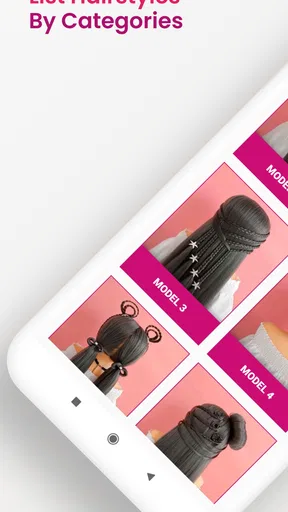
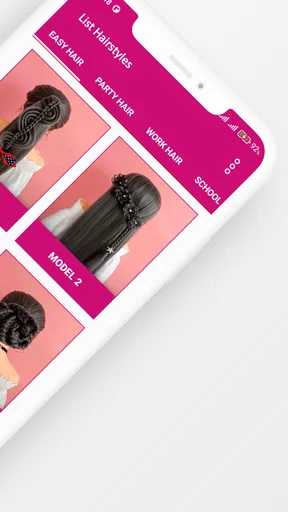
Upon opening the app, you’re presented with a plethora of hairstyle categories. We’re talking everything from quick and simple styles to more intricate creations. The app is designed to cater to all skill levels, so whether you can barely hold a brush or you’re a hair guru, there’s something here for you.
Exploring the Features
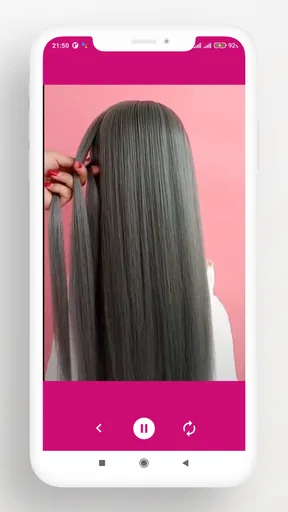
One of the coolest features is the step-by-step tutorials. The app provides detailed instructions accompanied by clear images, which makes following along a breeze. You can even pause and rewind the steps as needed, making it super user-friendly. For someone like me who’s a visual learner, this is a lifesaver.
Another sweet feature is the favorites list. As you browse through the hairstyles, you can save your top picks. This is perfect for those days when you want to try something new but can’t quite decide. Just head to your favorites, and bam, your options are right there.
Why It Stands Out
What sets this app apart from others is its wide variety of styles. From braids to buns, and twists to ponytails, the selection is vast. Plus, the app keeps updating with fresh styles, so you’re never out of new looks to try. I’ve found myself experimenting more with my hair, which makes the daily routine a bit more exciting.
Connectivity is another standout feature. You can share your favorite hairstyles with friends directly from the app. It's a fun way to swap style ideas and get feedback from your pals. You can even sync your favorite styles across devices, which is super handy if you switch between a phone and tablet.
User Experience
Using Easy Hairstyles for Girls is smooth sailing. The app is designed to be lightweight, so it doesn’t hog your device’s memory or drain the battery. Navigating through the menus is seamless, and I haven’t experienced any glitches or crashes, which is always a plus in my book.
Another thing I appreciate is the app’s community aspect. Users can leave comments and ratings on hairstyles, which helps when you’re deciding on a look. It’s like having a mini hairstylist community right at your fingertips.
Final Thoughts
In a nutshell, Easy Hairstyles for Girls is a must-have for anyone looking to spice up their hair game without spending hours in front of the mirror. It’s perfect for those busy mornings or when you’re in need of a little hairspiration. The app does an excellent job of making hairstyling approachable for everyone.
If you’re ready to transform your hair routine and try out some fabulous new styles, this app is definitely worth a download. Go ahead, give it a whirl, and let your hair do the talking!
Pros
- User-friendly interface for easy navigation.
- Wide variety of hairstyle tutorials available.
- Step-by-step instructions with images.
- Offline access to saved tutorials.
- Regular updates with new hairstyle trends.
Cons
- Contains ads that may interrupt usage.
- Limited advanced hairstyle options.
- No search function for specific styles.
- Some tutorials require in-app purchases.
- Lacks video tutorials for visual learners.
FAQs for Easy Hairstyles for Girls
What features does Easy Hairstyles for Girls offer?
Easy Hairstyles for Girls offers a wide range of tutorials for different hair types and lengths. The app provides step-by-step guides, video tutorials, and tips for creating hairstyles suitable for various occasions, from casual outings to formal events. Users can also bookmark their favorite styles for easy access.
Is Easy Hairstyles for Girls suitable for beginners?
Yes, the app is designed with beginners in mind. It provides detailed instructions and easy-to-follow video tutorials, making it simple for anyone to recreate the hairstyles. The app categorizes hairstyles by difficulty level, allowing users to gradually advance their styling skills.
Does the app require an internet connection to function?
While some features, such as downloading new content or accessing video tutorials, require an internet connection, many of the basic guides and instructions are available offline. This makes it convenient for users to style their hair without needing constant internet access.
Are there any in-app purchases or ads in Easy Hairstyles for Girls?
The app offers a free version with access to a variety of hairstyles and tutorials. However, there are in-app purchases available for unlocking premium content and removing ads. Users can choose to upgrade to enhance their experience and access exclusive styles and features.
How often is the content updated in Easy Hairstyles for Girls?
The app is regularly updated with new hairstyles and tutorials to keep up with the latest trends. Updates may include seasonal styles, celebrity-inspired looks, and user-requested tutorials. This ensures that users always have fresh and trendy options to explore and try out.


